
· Buying Guides · 12 min read
The Best App for Tracking Rainfall Amounts
After spending time with every rainfall app worth considering, we recommend Rain Tally for most homeowners. It's the only one designed around the watering decision rather than the number.
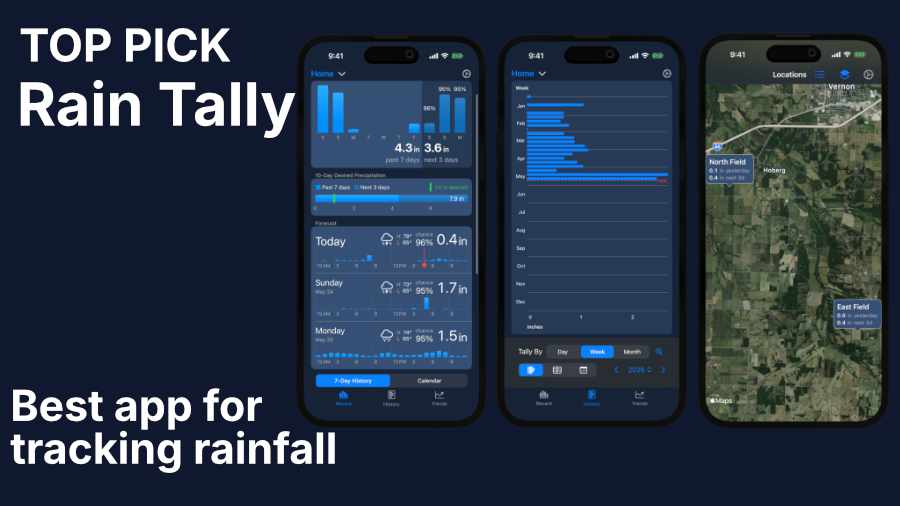
Finding an app that tells you how much rain actually fell at your house is surprisingly hard. The big-name weather apps focus on icons and chance-of-rain percentages, with actual rainfall amounts surfaced only behind a sub-screen, and the rainfall-specific apps that have sprung up over the past few years mostly compete on accuracy claims while leaving the homeowner to do the watering math themselves.
After working through every rainfall app worth considering, we recommend Rain Tally for most homeowners. It’s the only app in the category designed around the watering decision rather than the rainfall number itself.
The rainfall-amount gap
Rainfall-amount apps exist because the weather apps already on most homeowners’ phones don’t show how much actually fell. The apps that filled the gap differ in ways that matter once you start using one.
Homeowners and small-acreage growers have been shopping for a decade now. FarmLogs, the rainfall tracker many of them were using, went paid in February 2019. The product survives as Bushel Farm, row-crop farm management software with annual pricing from $75 to $599. None of those tiers is built around a homeowner who just wants to know how much rain fell in the yard.
That left people looking for a replacement. A Deer Hunter Forum thread from October 2019 puts the question plainly: “Does anyone have an app they like to use to track rainfall (or for those of us in the southeast, lack of rain)?” Seven years later the same question still surfaces in app reviews. A Precip user, Tanglegolf, wrote in May 2026: “Finally, an app that gives you the amount of precipitation by ZIP Code.”
What we looked for
Three things separated the apps we’d recommend to a homeowner from the ones that were competent but didn’t quite work for us.
We wanted an app that answered the watering question without us doing the math. That means showing past rainfall, the next few days of forecast, and a weekly rainfall target together on one view, so a homeowner can tell at a glance whether their yard has had enough water.
History and trends should reward exploring, not just storage. Most apps either skip history altogether or present it as a totals list to scroll through. The best apps let someone look at how this season runs against last year in a format that rewards spending time in it: a chart you can scrub, a calendar you can scroll, a moving total you can adjust.
Multiple locations belong on one account. Some people track rainfall in more than one location: a vacation place, a relative’s garden, a rental they manage from a distance. The apps that hold up only at a single location aren’t honest answers for them.
The benchmark most homeowners are aiming for is about 1 inch per week for an established cool-season lawn, per EPA WaterSense and most cooperative-extension guidance, with vegetable gardens in a similar range during the growing season. That number is what a good app’s weekly-target feature builds around, with the ability to customize the target depending on climate or planting specifics.
Our pick: Rain Tally
The category we worked through divides on what the apps think rainfall data is for. Most treat it as a number to display. Rain Tally treats it as input to the watering decision a homeowner is already making. It’s the rainfall app we recommend for most homeowners with a lawn or a garden.
Install Rain Tally for iPhone and iPad
Why we like it
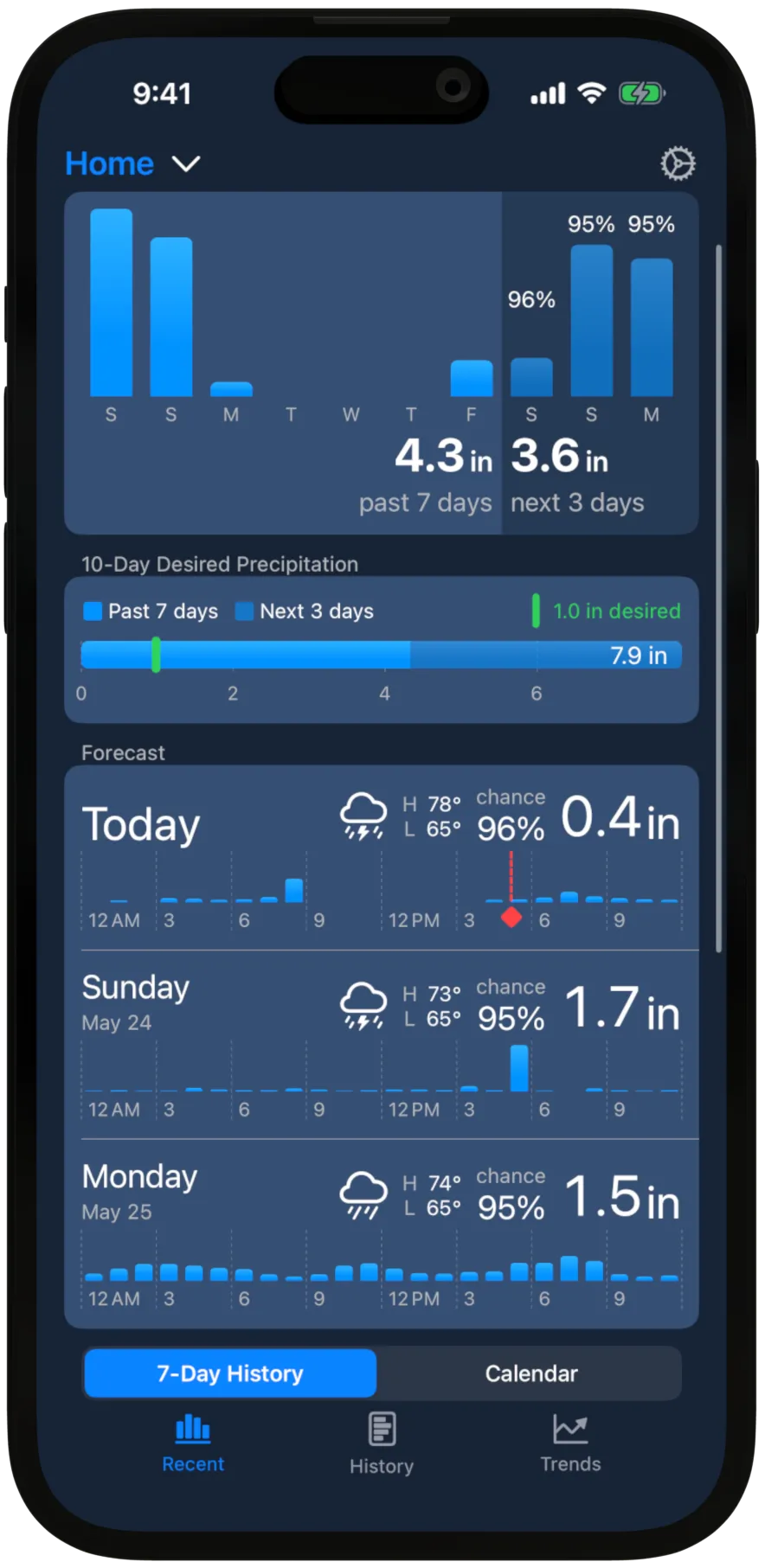
Rain Tally’s main screen is the reason to install it. The first chart shows the past 7 days of rainfall next to the next 3 days of forecast, with a weekly rainfall target beneath that shows how close you are to getting what you need.
That’s the watering decision in one glance. Jeremep, an App Store reviewer, wrote in June 2024: “I try to be judicious when deciding to water my lawn and Rain Tally has proven reliable and accurate enough to where I wont need a rain gauge.”
Below the chart, two lists carry the supporting detail: a row for each of the past 7 days showing its amount, and a row for each of the next 3 days showing amount, percent chance, and condition.
The History screen shows a full year of data as a chart, table, or calendar. The Trends screen is for looking across years: monthly precipitation totals compared to every year on record, year-to-date charts that show whether this year is running wet or dry compared to past years, and a running total you can adjust from a week up to a year. The running total is an interesting way to answer the question “are we in an unusually dry spell?” It shows you how much rainfall you’ve had for the last 30 days before every day on the chart. The visualizations are closer to a serious data tool than to a weather app, and nothing else in the category competes on that ground.
If you own a physical rain gauge, you can log a reading to override the weather service’s number. Most readers won’t bother, but the option is there for the days when the two disagree.
Flaws but not dealbreakers
Rain Tally is iPhone and iPad only. There’s no Android version, no Mac app, no Apple Watch app, no web client. For Android users this is a dealbreaker.
The forecast horizon stops at 3 days. The developers have been explicit about not building a general-purpose weather app, and rainfall amount forecast accuracy degrades past 72 hours.
Who this is for
Rain Tally fits a US homeowner with a lawn, a garden, or multiple yards to keep an eye on, who owns an iPhone or an iPad and wants the watering question answered in one place.
The free tier gets you the Recent screen for one location, which may be enough for most readers. The Plus tier ($19.99 a year, or $1.99 per month) opens the History and Trends screens and lifts the location cap to 10. That’s the right tier for someone tracking a second property or a community-garden plot, or someone who cares about historical data. Btrflies, another App Store reviewer, used Rain Tally during a drought to keep an eye on an Airbnb property 20 miles away in a different county. The Pro tier ($49.99 a year) extends to 50 locations, which is overkill for most homeowners but a fit for the food-plot hunters and small-farm operators discussed below.
Farmers and hunters managing food plots also use Rain Tally, dropping map pins to track rainfall at fields without street addresses. SP Arkansas, an App Store reviewer, wrote in May 2024: “As a Game Keeper and food plot enthusiast, I can say this app will save you money, and a headache. … [the app] is cheap compared to replanting!”
Runner-up for Android: Precip
For Android users who want a rainfall-amount tracker, we recommend Precip. At the time of writing, it has 4.7 stars on Google Play and is one of the most downloaded apps in the category.
Precip doesn’t have all of the features we liked in our top pick. There’s no single screen that combines past rainfall with the forecast and a weekly target; the app’s focus is radar visualization and historical totals. User reviews show that in January 2026 the free tier changed in a way that made casual use frustrating, with every map pan or zoom counting against the free daily quota.
For an Android user, Precip is the best choice. On iPhone, Rain Tally is the better pick.
The competition
RainDrop
RainDrop is widely advertised on Facebook and on the App Store, and it’s built around multi-location tracking with a clean recent-totals view and a map. On Android it’s popular, with more than 100,000 Google Play downloads, but reviews are mixed at 3.4 stars at the time of writing.
Most of the useful functionality is for paying users, and in February 2026 the developer removed the previously-free multi-location feature, which prompted a wave of negative reviews. The developer partially walked the change back, and Android users today can use the app for one location plus an additional GPS-derived location without paying.
Weather Underground PWS map
Weather Underground’s network of hobbyist-owned personal weather stations is useful if a neighbor within walking distance has installed one. It isn’t a tool for tracking your own data unless you own a weather station.
The data shown isn’t your gauge; it’s someone else’s, read through their station. Whether you have meaningful coverage depends entirely on whether a hobbyist has set up shop near you, and the closest station can be a mile or more away even in dense neighborhoods. For years the default lawn-forum recommendation has been Weather Underground plus a physical rain gauge in the yard, and the implicit acknowledgment in that pairing is that the station network alone wasn’t enough.
Climate FieldView
Climate FieldView is excellent at what it does: running a commercial farm-management system for row-crop growers. It isn’t built for a homeowner with a yard.
Rainfall is one feature inside a $649-and-up annual Plus subscription built for corn and soybean farmers.
CoCoRaHS Observer
CoCoRaHS, the Community Collaborative Rain, Hail and Snow Network, is a NOAA-backed citizen-science observer network with more than 27,500 active observers. If you want to contribute and are willing to buy the approved 4-inch gauge for about $42, this is the right tool.
The Observer app’s job is logging readings into the network’s research dataset, not visualizing them back for the observer. CoCoRaHS readings are widely treated as the most accurate measurement of what actually fell at a location, and several apps rely on its observers as a check on their own numbers.
Tempest companion app
Tempest is the companion app that ships with WeatherFlow’s home weather station hardware, which starts at about $330. If you already own a Tempest, this is the app that supports it. Don’t buy the hardware just to get the app.
Tempest community forum threads document the station’s rain sensor under-reading rainfall compared to a manual gauge nearby. Some owners explicitly keep a CoCoRaHS-style gauge alongside the Tempest as a backup measurement. None of that is a strike against owning a Tempest as a personal weather station; it’s a strike against thinking the companion app alone does the rainfall job.
Frequently asked
Is there a free app that tracks rainfall amounts?
Rain Tally’s free tier covers one location and shows past rainfall, the 3-day forecast, and a weekly target on the same screen, which is enough for a homeowner with one yard. On Android, Precip has a free tier as well. Both apps have paid subscriptions for multi-location tracking, full history, and trend visualization.
How accurate are these apps?
Rainfall amount can vary by inches over a mile within a single storm, and no app and no weather service can capture that resolution from radar alone. All apps in this category are approximations of what fell at your location. A $5 to $15 plastic gauge in the yard beats any radar-derived estimate for what actually fell at your specific spot. Among the apps in this guide, Rain Tally is the only one that lets you log your own gauge reading to override the weather service’s number when the two disagree.
Why not just use my phone’s weather app?
Apple Weather, AccuWeather, The Weather Channel, and similar apps are built around the forecast, not what already fell. They can show precipitation amounts, but only after you tap into a sub-screen and select the precipitation view, and even then they don’t surface anything older than yesterday. None of them combines past rainfall with the forecast on a single screen.
How much rainfall does my lawn or garden need?
About 1 inch of water per week for an established cool-season lawn, per EPA WaterSense and most cooperative-extension guidance. Warm-season grasses can vary, and vegetable gardens fall in a similar range during the growing season. Rainfall and sprinkler water both count. A rainfall app tells you whether natural rain has already covered the week’s inch, or whether you need to make up the difference with the sprinkler.
- best rainfall app
- rainfall tracker
- virtual rain gauge
- rain gauge app
- rain tracking